
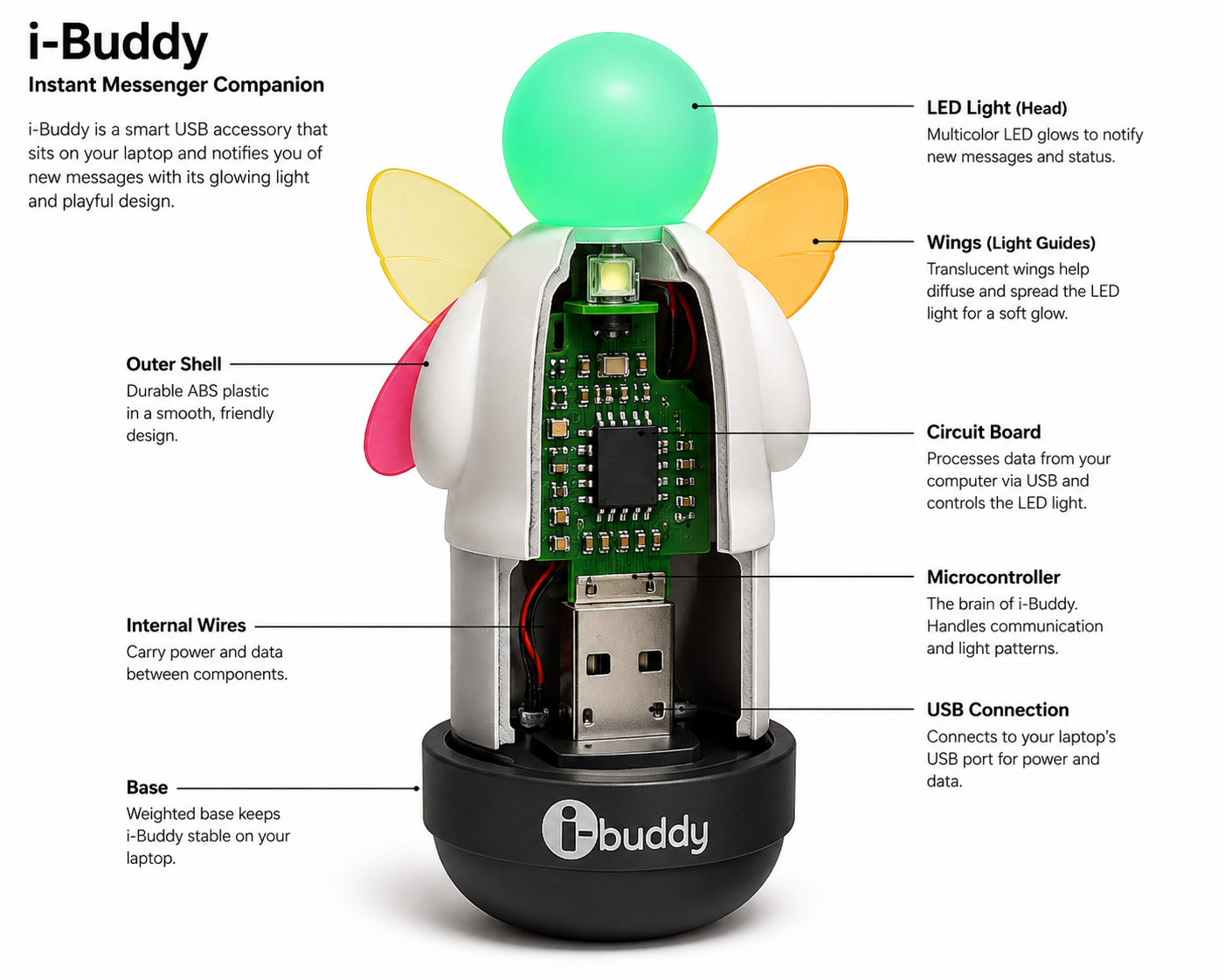
The i-Buddy was a delightful companion for Reviving the MSN Messenger I-Buddy: How to Bring This Classic Messenger Gadget Back to Life in 2026 users, lighting up and flapping its wings to signal incoming messages. Although MSN Messenger was discontinued in 2013, retro-computing enthusiasts have revived the i-Buddy’s functionality. By connecting the device to alternative messaging networks like Escargot, which emulate the classic MSN experience, users can still enjoy the i-Buddy’s interactive features today—especially when paired with older versions of Windows Live Messenger.
To get an i-Buddy working again, you’ll need some patience, but the steps are quite straightforward. The device connects via USB and is typically recognized automatically by modern Windows systems. Installing the widely recommended i-Buddy 2.10 software enables the gadget to communicate correctly with your computer, allowing it to translate chat events into its signature movements and lighting effects.
After setting up the software, users can personalize the i-Buddy’s reactions to various notifications—such as glowing in chosen colors or flapping its wings when friends come online. For retro technology fans, restoring an i-Buddy is not just a technical task but a nostalgic journey to the golden age of instant messaging and a tribute to one of the internet’s most iconic desktop accessories.
One key reason the MSN Messenger i-Buddy remains popular today is its unique blend of technology and personality. Unlike typical computer accessories, the i-Buddy was crafted to interact with users in a playful and engaging manner. Its glowing LED lights, animated wing movements, and responsive reactions to incoming messages gave it the charm of a living companion beside the computer.
Back in the MSN Messenger days, millions of users loved to see how their i-Buddy would react to chat activity, making the online experience interactive. As modern technology becomes more and more focused on software and mobile devices, gadgets like the i-Buddy are a reminder of a time when desktop accessories were creative, fun and full of character.The i-Buddy has also benefited from the growing popularity of retro computing.
Vintage hardware that captures important moments in the history of the Internet is hotly pursued by collectors and tech enthusiasts. The i-Buddy became an icon of the early social internet because it was directly tied to the rise of instant messaging. A lot of users just like to revive old devices and write about their experiences on blogs, YouTube videos, and online communities about retro technology. i-Buddy is an interesting gadget that is still attracting attention of people who love the classic gadgets and digital nostalgia. It can be used as a fully functional desktop accessory or just as a collectible.Thanks to modern community projects, keeping the i-Buddy has been made easier than ever.
The i-Buddy gadget can be used in various ways and settings:
1. Retro Chatting (Escargot Network)Windows Live Messenger: The primary use of the i-Buddy is to revive the classic MSN Messenger experience. When a message or emoticon is received, the device flaps its wings and lights up.
2. Music Visualizer Winamp Player: You can connect it to the classic Winamp music player. It will then twist its body and change its headlight color in sync with the song’s beat and bass.
3. PC Notifications and AlertsCustom Scripts: If you have some coding knowledge, you can use Python scripts available on GitHub. By connecting it, you can configure it to blink for standard PC alerts, such as receiving an email or a low battery warning.
4. Gaming Setup/Desk Toy Aesthetic Companion: People often place it on their retro gaming setups or computer desks as a decorative piece; it connects via USB and emits a soft glow.