
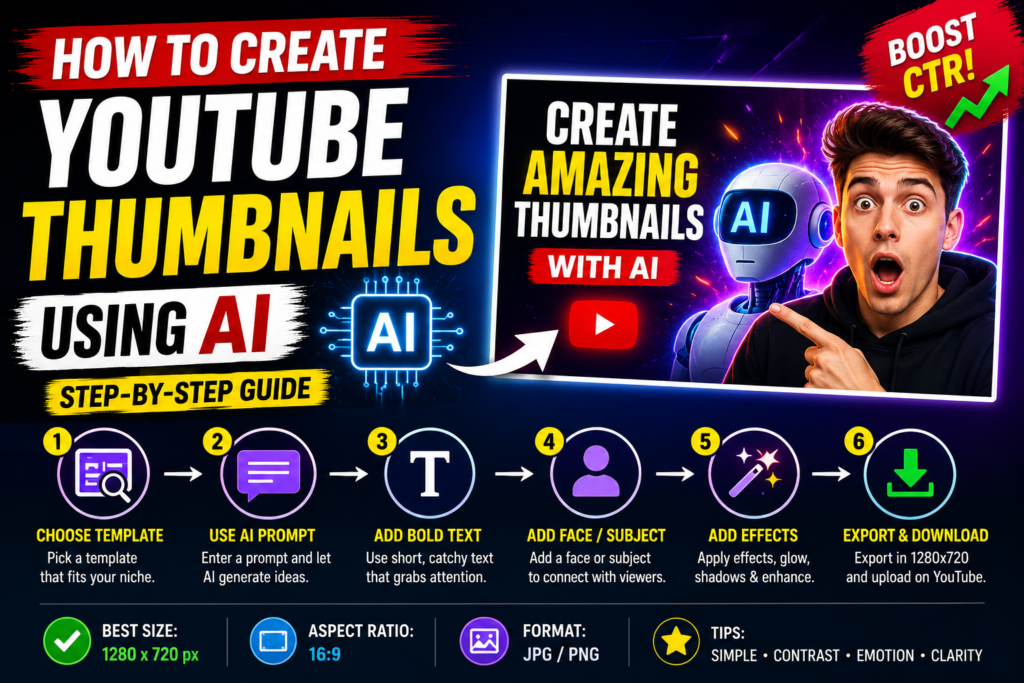
Source : Ai image
How to Create YouTube Thumbnail using AI
YouTube thumbnails are one of the biggest factors behind getting more views. A good thumbnail can improve your CTR (Click Through Rate) and help your videos reach more people. In 2026, AI tools make thumbnail creation faster, easier, and more professional — even if you have no design experience.In this guide, you will learn how to create YouTube thumbnails using AI tools for free using both mobile and desktop.
Why AI Thumbnails Are Important
AI-generated thumbnails save time and help creators design eye-catching visuals quickly. Many YouTubers now use AI thumbnail maker tools because they can create professional designs in minutes.
Benefits of AI thumbnails:
- Faster degine process
- high quality graphics
- better CTR
- Beginner friendly editing
- Mobile support
If your thumbnail looks attractive, viewers are more likely to click your video.
Best AI Tools for YouTube Thumbnails
1. Canva Ai
Canva AI is one of the best free AI thumbnail generator tools for beginners. It offers ready-made templates, AI image generation, and drag-and-drop editing.
Best for :
- Tech videos
- Educational content
- Faceless YouTube channel
2. Leonardo AI
Leonardo AI helps create cinematic and gaming-style thumbnails. It is popular among gaming creators and AI art users.
Features:
- HD Ai images
- Realistic lighting
- Gaming effects
- Fast image generation
3. Microsoft Deginer
Microsoft Designer uses AI to generate thumbnail ideas automatically. You simply enter your topic and it creates multiple layouts.
Step-by-Step Guide to Create AI Thumbnails
Step 1: Choose Your Video Topic
First Decide what your video is about.
Examples:
- Ai tools
- gaming
- Tech news
- online earning
- Mobile Blogging
Your thumbnail should clearly match the topic .
Step 2: Write an AI prompt
Ai tools work best with detailed prompts
Example prompt:
“Create a professional YouTube thumbnail with a shocked YouTuber face, glowing AI background, cinematic lighting, bold colors, viral style, ultra HD.”
Generate multiple versions and pick the best image.
Step 3: Edit Thumbnail in Canva
upload your ai generated image to Canva.
Add
- Bold text
- Glow effects
- Arrows
- icons
Keep the degine simple and clean.
Step 4: Add Short Text
Your thumbnail text Short and easy to read .
Good example:
- Free ai tools
- viral trick
- earn with ai
Avoid using tools many words because mobile users may not read small text.
Conclusion
Learning how to create YouTube thumbnails using AI can help your channel grow faster in 2026. Tools like Canva AI and Leonardo AI make it easy for beginners to create professional thumbnails directly from mobile devices.Focus on simple design, bold text, bright colors, and emotional visuals. Better thumbnails can increase CTR, improve views, and help your videos perform better on YouTube.